Part I — Install it
Seven steps, strictly sequential. Do them in order.
Prerequisites
Three tools to install before anything else. All three are Homebrew packages — if you already have them, each check-then-install is a single command.
Homebrew
Node.js (required for Claude Code)
iTerm2
Open iTerm2 once to complete its initial setup, then continue inside it. iTerm2 is required because $ITERM_PROFILE is what makes per-pane role detection work.
This repo
Later steps copy files out of it — the shell snippet, the hooks, the skills and the slash command. Clone it now and stay in that directory for the rest of Part I:
Install and authenticate Claude Code
Claude Code is Anthropic’s official CLI. Install it globally via npm, then authenticate. Browser OAuth is the recommended path — no API key required.
Install and authenticate
Authenticate with browser OAuth (recommended):
Sign in with your Anthropic account (Pro or Max plan). No API key needed with this method.
Verify
Create four iTerm2 profiles
Create four named profiles, each with a distinct background tint, tab colour, and badge so you can instantly tell which pane you’re in.
Each pane runs a separate Claude Code session with a dedicated role. The AUDIT pane uses Opus for deep review. Everything else uses Sonnet to keep costs down. A cc alias launches the right configuration automatically.
Create and name four profiles
Open iTerm2 → Settings → Profiles (⌘,). Click the + button four times. Double-click each "New Profile" name to rename it:
| Profile Name | Background Hex | Tab Colour Hex | Role |
|---|---|---|---|
| CC-AUDIT | #0d0b18 | #a855f7 | Evaluation / Auditing |
| CC-IMPL | #080f0b | #22c55e | Implementation |
| CC-PROMPT | #080e10 | #06b6d4 | Prompt engineering |
| CC-PLAN | #0d0b00 | #f59e0b | Planning / Architecture |
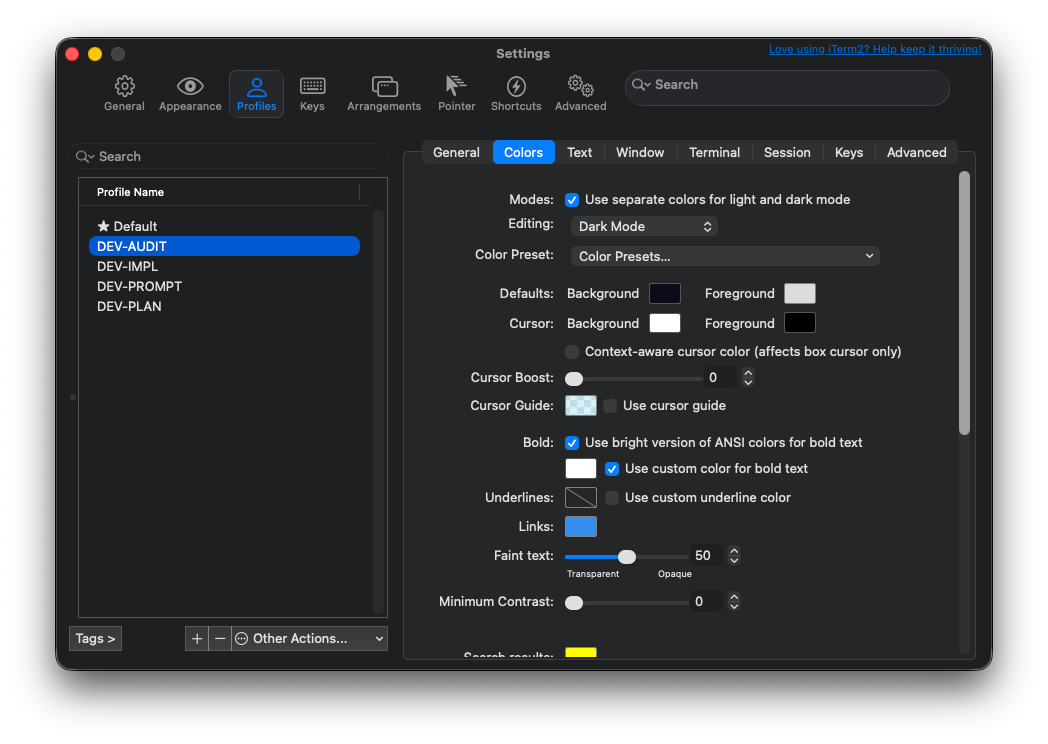
Colors tab — background & tab colour
For each profile, click the Colors sub-tab:
- Click the Background swatch in the "Defaults" row. In the macOS colour picker, switch to Hex mode (sliders icon → dropdown at bottom) and enter the hex value from the table above.
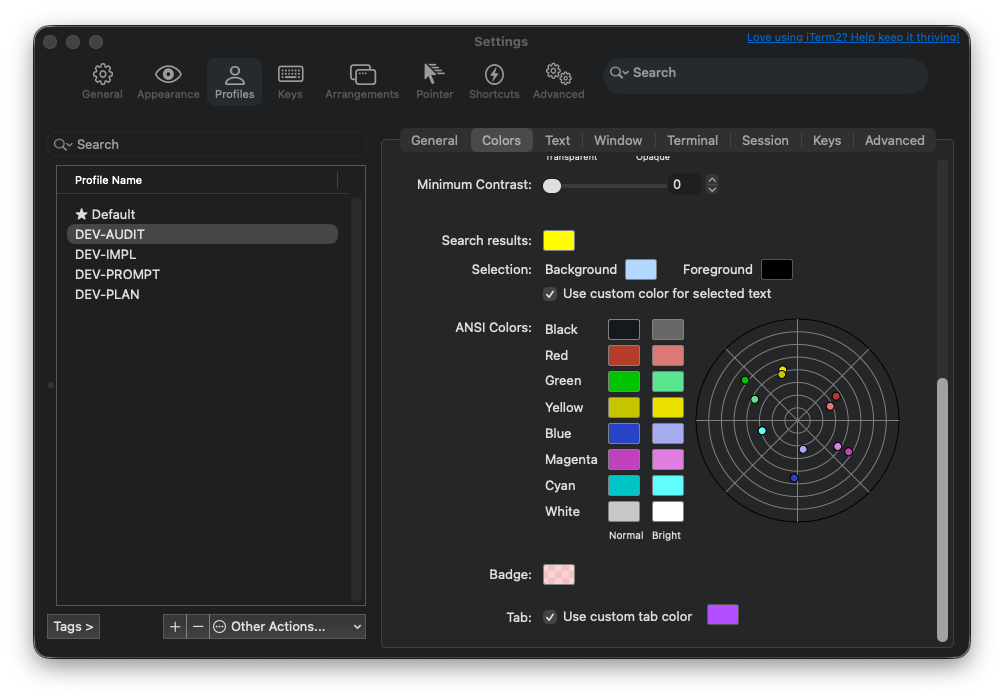
- Scroll down to "Tab:", tick "Use custom tab color", and set the accent colour. Keep everything else from your base theme.
General and Text tabs — title, badge, and font
Click the General sub-tab for each profile:
- Title: Click the dropdown. Under "Foreground Job", uncheck "Job Name" so only "Session Name" stays ticked. This stops -zsh appearing after the role name.
- Badge: Type the short role name. This overlays a faint watermark on the pane background.
Then click the Text sub-tab and set the font to JetBrains Mono 13pt (or Menlo 13pt).
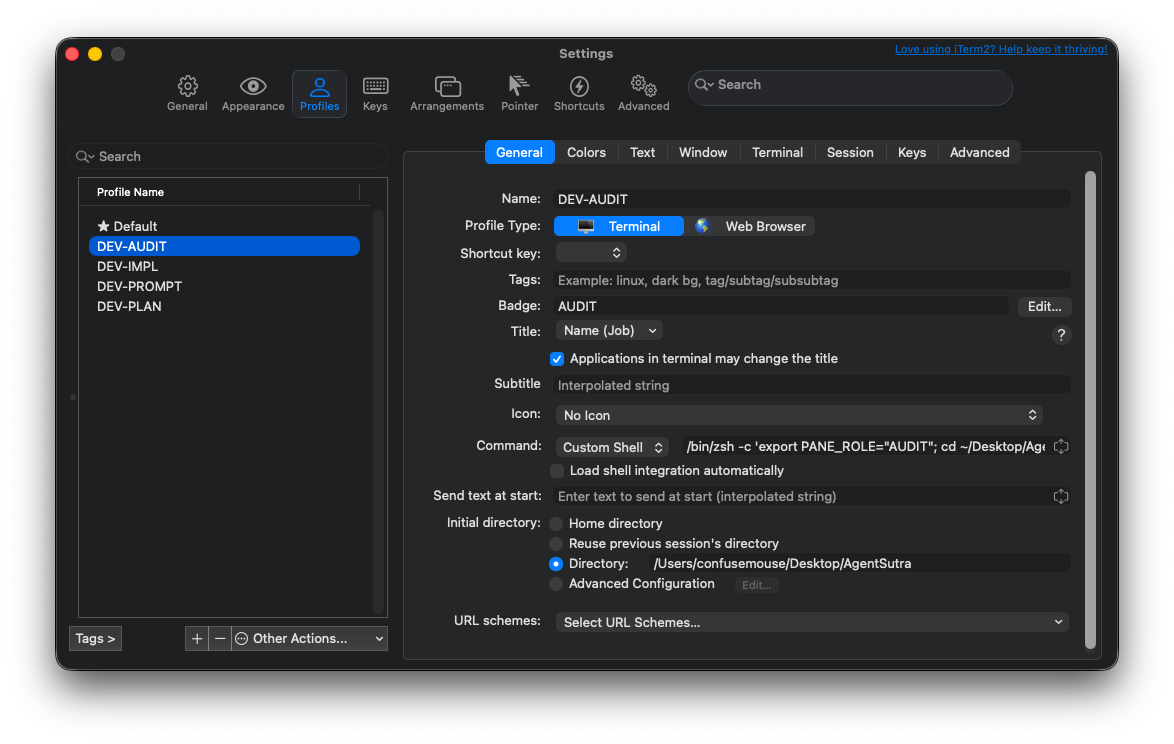
Startup command and initial directory
Each profile needs a startup command (to cd into the project directory and open an interactive shell) and an initial directory setting (as a fallback for window arrangement restores).
Set the startup command
In each profile → General sub-tab → change the Command dropdown from "Login Shell" to "Custom Shell" and enter:
Replace your-project with your project directory name.
exec zsh at the end? It replaces the subshell with an interactive zsh session. Without it, the pane would close the moment you exit Claude Code or any other command.Set the initial directory
Still in the General sub-tab, find Initial directory below the Command field. Change from "Home directory" to "Directory:" and enter the full path:
Shell snippet
Append zshrc-snippet.sh (from this repo) to your ~/.zshrc. It auto-detects which profile you’re in and configures coloured prompts, locked tab titles, and a cc alias to launch Claude Code with the right flags.
Append to ~/.zshrc
The snippet provides:
- $PANE_ROLE and a coloured prompt per profile
- a title-lock so the pane title stays fixed (won’t flip to -zsh)
- the cc alias — launches Claude with the correct model, effort and permissions for the pane you are in
- gate and ship aliases (IMPL pane only)
- Ollama env vars and llm-* aliases (uncomment your tier’s block — Part III)
It keys off $ITERM_PROFILE and appends to precmd_functions so it won’t clobber pyenv, fnm or conda.
What the snippet contains
- $ITERM_PROFILE is set automatically by iTerm2 on every session — including arrangement restores. No dependency on startup commands.
- precmd_functions+=() adds to the hook array rather than overwriting it, so existing hooks from pyenv, fnm, conda, etc. are preserved.
- Normal terminals (Default profile) are completely unaffected.
Verify
Open a new pane using the CC-IMPL profile, then:
If $PANE_ROLE is empty, the pane was not opened with a CC-* profile — open it via Profiles → CC-IMPL in the menu bar.
Window layout and saved arrangement
Create a 2×2 pane layout, save it, and configure iTerm2 to restore it automatically on launch.
Create the 2×2 split
- Open a new window with the CC-AUDIT profile.
- ⌘D — split right. Right-click the new pane → Edit Session → change profile to CC-PROMPT.
- Click back on the left pane (AUDIT). ⌘⇧D — split down. Change the new bottom-left pane to CC-IMPL.
- Click on the right pane (PROMPT). ⌘⇧D — split down. Change the new bottom-right pane to CC-PLAN.
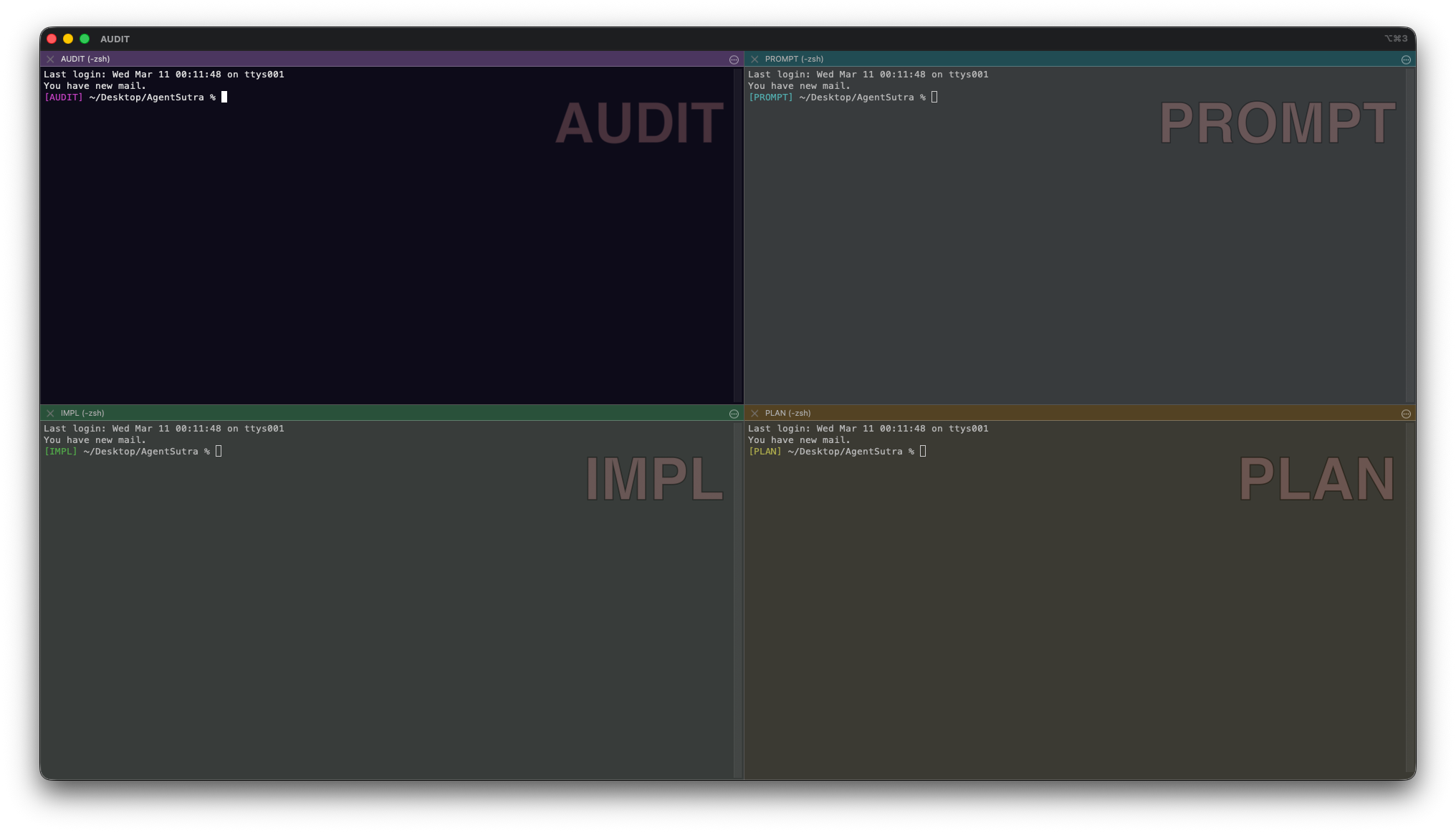
Save as default arrangement
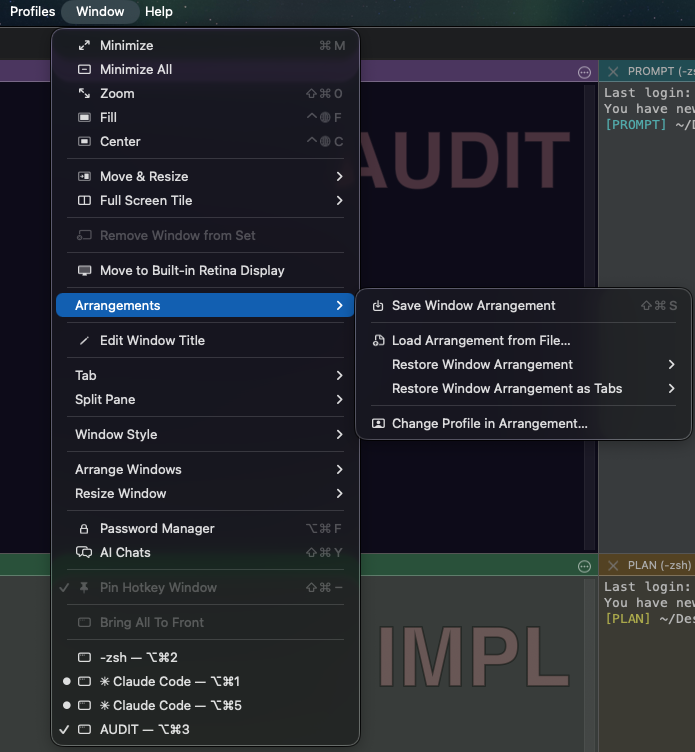
- Window → Save Window Arrangement — give it a name (e.g. your project name).
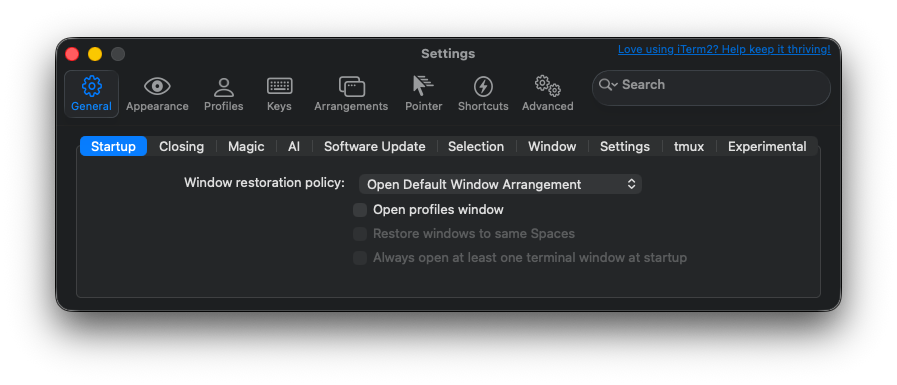
- Go to iTerm2 → Settings → General → Startup and set the window restoration policy to "Open Default Window Arrangement".
- Back in the menu: Window → Save Window Arrangement once more, selecting the same name — this saves it as the default arrangement the startup policy will use.
Launch with cc
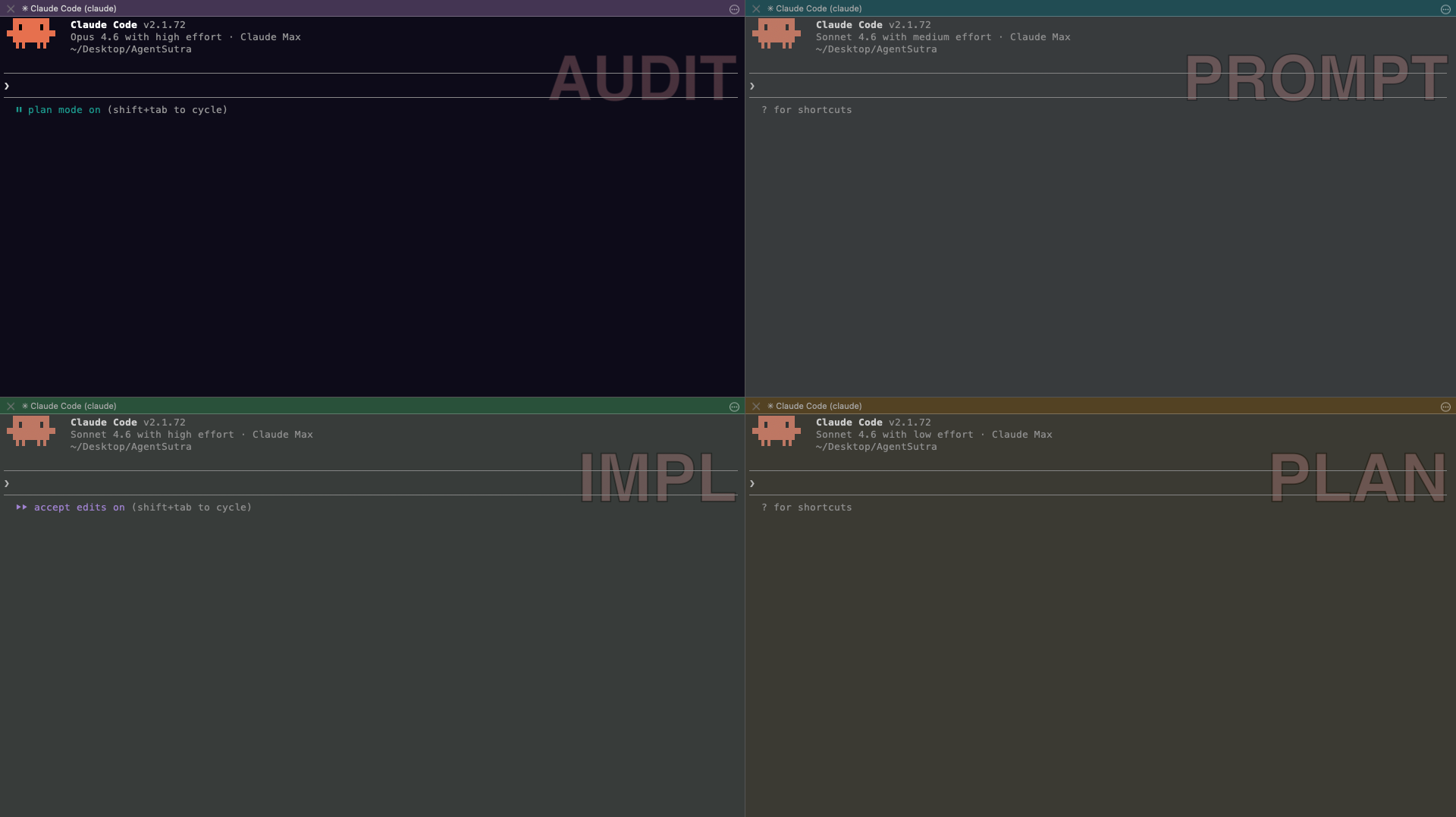
Type cc in each pane. That’s it. The alias expands per pane.
| Pane | cc expands to | What you see |
|---|---|---|
| AUDIT | claude --model opus --effort high --permission-mode plan | Opus · plan mode on |
| IMPL | claude --model sonnet --effort high --permission-mode acceptEdits | Sonnet · accept edits on |
| PROMPT | claude --model sonnet --effort medium | Sonnet · medium effort |
| PLAN | claude --model sonnet --effort low | Sonnet · low effort |
Note: On some systems, cc is aliased to the C compiler. If you work with C/C++, rename the alias to cl or claude-go in your ~/.zshrc.
Verified CLI flags
| Flag | Purpose |
|---|---|
| --model opus | Use Opus (aliases: opus, sonnet, haiku, or a full ID like claude-fable-5) |
| --effort high | Thinking budget: low · medium · high · xhigh · max. PLAN uses low — architectural discussion doesn’t need deep reasoning chains. |
| --permission-mode plan | Read-only — Claude can’t write files. Full set: plan, acceptEdits, auto, manual, dontAsk, bypassPermissions |
| --permission-mode acceptEdits | Auto-accept file edits without asking |
| --append-system-prompt "..." | Add custom instructions on top of defaults |
| --continue | Resume most recent conversation |
| --resume | Resume a specific session by ID |
--dangerously-skip-permissions: --permission-mode acceptEdits is more targeted — it auto-accepts file edits while still asking before shell commands. Only use --dangerously-skip-permissions in fully sandboxed environments.Part II — Work in it
How work moves between panes
Work goes round a fixed loop, and you carry it across pane boundaries by hand.
The change cycle
Carrying findings across
When AUDIT identifies an issue, copy its output and paste it into IMPL with:
Context hygiene
- Run /clear in the AUDIT pane before every review pass. Otherwise AUDIT reviews the versions cached in its context, not what IMPL just wrote.
- Re-anchor on long sessions: "Before starting, re-read CLAUDE.md and confirm the project invariants. Then…"
- Scope AUDIT explicitly: "Focus ONLY on src/auth.py and src/middleware.py. Do not read any other files unless I explicitly ask."
- /compact frees context without losing all history — use it instead of /clear when the history still matters.
The gate and ship commands
Nothing reaches AUDIT until the tests pass.
| Alias | What it runs | When to use |
|---|---|---|
| gate | pytest suite (tests/); exits non-zero on failure | Before handing off to AUDIT |
| ship | gate + interactive git add -p + git commit | When tests pass and work is commit-ready |
Using them
gate and ship are defined only when $ITERM_PROFILE == CC-IMPL. Running them in other panes is a harmless no-op.
The loop
Start pytest-only; add lint, type checking and a docker build to gate once you know they are load-bearing.
The SESSION_LOG pattern
A SESSION_LOG gives the next session somewhere to resume from.
Keep SESSION_LOG.md in the project root
Append a new entry at the end of every session; never overwrite old entries. Minimum viable format:
Real example:
Instruct Claude to read it on session start
In your CLAUDE.md (see section 11), add a Session Continuity instruction: "At the start of every session, read the last 60 lines of SESSION_LOG.md and surface the most recent 'Next:' items before doing anything else."
Splitting rules: CLAUDE.md and AGENTS.md
Split global rules from project rules so neither leaks into the other.
Two files, two scopes
| Scope | Put it in | Committed? |
|---|---|---|
| Your personal conventions, every project | ~/.claude/CLAUDE.md | No — personal |
| Shared project rules, every agent reads them | AGENTS.md | Yes |
| Claude-only additions for this project | CLAUDE.md importing @AGENTS.md | Yes |
Load order is: managed policy, then user ~/.claude/CLAUDE.md, then project ./CLAUDE.md, then ./CLAUDE.local.md. They concatenate — later files add to earlier ones, they do not override them.
@path imports pull one rules file into another. Absolute, ~ and relative paths all work, and imports nest up to four levels deep.
Sharing one rule set with other agents
AGENTS.md is an open standard (agents.md) used by over 60,000 open-source projects and supported by a couple of dozen agents, among them Codex, Cursor, Copilot, Gemini CLI, Zed and Aider. From v2.1.277 Claude Code reads it too.
Claude Code reads AGENTS.md only when it finds no CLAUDE.md, .claude/CLAUDE.md or CLAUDE.local.md in that directory or any directory above it. Your personal ~/.claude/CLAUDE.md does not count — it keeps loading alongside.
So the portable pattern is: put the shared rules in AGENTS.md, and make CLAUDE.md a one-line import.
Every agent then reads the same rules, and you can still append Claude-only rules underneath the import line.
Use the included templates
Two starter templates ship with this repo: CLAUDE.md.template (copy to ~/.claude/CLAUDE.md, do not commit) and REFERENCE.md.template (copy to .claude/REFERENCE.md and commit — the AUDIT pane uses it for sprint context and known issues).
Adapting it to another project
This setup is project-agnostic. To use it with a different codebase:
Rename profiles
CC-AUDIT → MYPROJECT-AUDIT, and so on for IMPL, PROMPT and PLAN.
Update Initial directory in each profile
Point each profile’s General tab at the new project path.
Update ~/.zshrc
Add new case entries matching the new profile names, in both case blocks:
Add project-specific slash commands
Drop them in .claude/commands/ so they travel with the repo.
Save a project-specific arrangement
Name it after the project (Window → Save Window Arrangement). To switch between projects later, use Window → Arrangements → [arrangement name] — iTerm2 opens that project’s saved 4-pane layout in a new window.
Part III — Optional add-ons
Each of these is independent. Skip any of them and Parts I and II still work.
Safety hooks
Hooks enforce what prompt instructions only request. Claude Code runs them before and after tool use, and at session start.
| Tier | Event | Purpose |
|---|---|---|
| PreToolUse | Before the tool executes | Block dangerous actions before they happen |
| PostToolUse | After the tool returns | Observe outcomes; trip circuit-breaker on repeat failures |
| SessionStart | When a new session opens | Reset counters; validate session state |
Copy the hook scripts to ~/.claude/hooks/
Merge hooks/settings.json.example into ~/.claude/settings.json
Merge the "hooks" block from hooks/settings.json.example into the top level of ~/.claude/settings.json. All "command" values use $HOME — Claude Code does not expand ~.
$HOME instead of ~? Claude Code does not expand ~ in hook command strings. Use $HOME, which the shell expands at execution time, or replace it with your full absolute path.The example also sets CLAUDE_AUTOCOMPACT_PCT_OVERRIDE to "50", auto-compacting the conversation at 50% of the context window; "0" disables it.
What each hook does
| Hook | Tier | Blocks when |
|---|---|---|
| protect-env.py | PreToolUse | Edit/Write/MultiEdit targets any .env file |
| protect-git-push.py | PreToolUse | Bash command matches git … push (any flag order) |
| circuit-breaker.py | PostToolUse | 3 consecutive tool failures in a session |
| session-start-reset.py | SessionStart | (resets failure counter — never blocks) |
| version-check.py | SessionStart | (never blocks — prints update checklist when Claude Code version changes) |
MCP server, slash commands and skills
A GitHub MCP integration, the /reflect command, and three contextual skills.
GitHub MCP server
Claude Code registers user- and local-scoped MCP servers via claude mcp add, and reads project-scoped servers from a committed .mcp.json at the repo root. The included .mcp.json.example is reference JSON if you need claude mcp add-json instead.
Generate a read-only PAT at github.com/settings/tokens with scope public_repo (or repo for private-repo access); recommended expiry 90 days. Verify with claude mcp list | grep github. -s user registers the server for all projects — omit it to restrict to the current one.
/reflect slash command
commands/reflect.md defines a command you run at the end of an IMPL or AUDIT session: it reads the recent git log and diff, then outputs a table of suggested CLAUDE.md additions. It never edits the file — you decide what to incorporate.
Contextual skills
The skills/ directory holds three skills that load automatically when the task matches their trigger description.
| Skill | When it activates | What it adds |
|---|---|---|
| code-review | Code review tasks (AUDIT pane) | Project-specific review conventions |
| security-audit | Security review tasks (AUDIT pane) | Security checklist and vulnerability patterns |
| testing | Writing/reviewing tests (IMPL pane) | pytest conventions matching the project |
Local models with Ollama
Private inference on your own machine, with no API calls. Nothing else in this guide requires Ollama — only Sigil (section 16) does, for its fact classifier.
| Tier | RAM | What you get |
|---|---|---|
| 🌺 Base | 16 GB+ | Claude Code + small local models (fast/code/embed) |
| 🔵 Mid | 32 GB+ | Above + reasoning model + larger fast/code models |
| 🔴 Full | 64 GB+ | Above + vision model + 32B code model (~20 GB) |
Pull the block matching your RAM. Times assume a 100 Mbps connection.
16 GB+ (~15 min, ~10 GB)
32 GB+ (~40 min, ~23 GB total) — pull these instead of the 8b/7b versions
64 GB+ (~90 min, ~55 GB total) — use these instead of the 14b versions
Uncomment your tier’s block in the Ollama section at the bottom of zshrc-snippet.sh to get llm-fast, llm-code, llm-reason (🔵 32 GB+), llm-embed and the llm-smart router.
Persistent memory with Sigil
Every pane is a separate session, and every session starts with amnesia.
Sigil is an open-source, local-first memory system by Anmol Srivastava. It runs hooks inside every Claude Code session that inject relevant stored facts before Claude sees your prompt, and capture memorable ones afterwards.
Why this setup in particular benefits: the SESSION_LOG pattern carries context forward in time within one project. Sigil carries it sideways — across all four panes and across project boundaries, so you stop re-explaining "we use pnpm, not npm" in every pane, every session.
Everything else — database choice, embedding provider, namespaces, the sigil facts / remember / search / ingest commands, MCP wiring for other clients — is covered in the upstream README at github.com/Anmol-Srv/sigil. Never store secrets in it: the database is local but not encrypted at rest.
iTerm2 triggers
Auto-highlight keywords in terminal output.
Profile → Advanced → Triggers → +
| Regex | Action | Colour |
|---|---|---|
| \b(CRITICAL|ERROR|FAIL(ED)?)\b | Highlight Text | Red background |
| \b(PASS(ED)?|SUCCESS)\b | Highlight Text | Green background |
| \b(WARNING|WARN|TODO)\b | Highlight Text | Yellow background |
Part IV — Reference
Agent teams or four panes?
Claude Code can already spawn teammates into split panes — it solves a different problem.
Agent Teams is a built-in, experimental feature, off by default. Enable it with CLAUDE_CODE_EXPERIMENTAL_AGENT_TEAMS=1. iTerm2 split panes additionally need the it2 CLI and the iTerm2 Python API enabled.
Teammates run inside one lead session, and that is where the difference bites:
- Permissions are inherited. "Teammates start with the lead’s permission mode," and "you can’t set per-teammate permission modes at spawn time." There is no way to spawn a teammate that is read-only while the lead writes files — which is the whole basis of the AUDIT pane.
- Tokens. Teammates use significantly more tokens — one context window each.
- Durability. /resume and /rewind do not restore in-process teammates.
Common questions
Can I run this with tmux instead of iTerm2?
Partly — you would have to replace the role-detection mechanism. The snippet branches on $ITERM_PROFILE, which iTerm2 sets for you on every session, including arrangement restores. In tmux you would set your own per-pane environment variable and branch on that, and rebuild the layout and colours in tmux config.
Does the reviewer really not write files?
Yes. The AUDIT pane launches with --permission-mode plan, which is enforced by Claude Code itself, not by an instruction in a prompt. It can read, search and report; it cannot edit.
How much does running Opus in one pane cost?
About 2.5× Sonnet per token — Opus 5 is $5/$25 per million against Sonnet 5's $2/$10, checked September 2026 — and only on review passes. AUDIT is idle while you implement, and a review reads far fewer tokens than an implementation session writes. The other three panes stay on Sonnet.
Can I use fewer than four panes?
Yes — IMPL plus AUDIT is the pair that earns its keep. PLAN and PROMPT are conveniences; drop them and use /clear in IMPL when you switch modes. Keep the separation between the pane that writes and the pane that reviews.
Does this work on Linux or Windows?
Claude Code does; this layout does not. The profiles, arrangements and $ITERM_PROFILE detection are macOS + iTerm2. The circuit-breaker hook uses fcntl, so they run on macOS and Linux but not Windows.
Do I need Ollama?
No. Nothing in Parts I or II touches it. It is only a prerequisite if you install Sigil and want its classifier to stay inside the hook time budget.
Troubleshooting
Common failure modes and how to fix them.
$ITERM_PROFILE is empty, cc launches with wrong model
Symptom: echo $ITERM_PROFILE returns nothing; the cc alias falls through with no model flags.
Cause: iTerm2 older than 3.3, or the pane was opened before the profile was applied.
Fix: update iTerm2 to 3.3+ (Help → Check For Updates), then reopen the pane via Profiles → [your profile name] → Open in current tab. Confirm with echo $ITERM_PROFILE — it should print CC-AUDIT, etc.
cc launches the C compiler instead of Claude
Symptom: which cc shows /usr/bin/cc — cc is the C compiler on many systems.
Fix: rename the alias in ~/.zshrc, replacing all 4 alias cc= occurrences with alias cl= (or any name), then source ~/.zshrc.
Hooks not firing
Symptom: .env edits or git push commands are not blocked.
Circuit-breaker stuck after tool failures
Fix A: press Ctrl+C, then cc — session-start-reset.py resets the counter at session start.
Fix B: delete the state file:
gate fails with "pytest not found" or 0 tests collected
- Activate your venv first: source venv/bin/activate (or .venv/bin/activate).
- Verify: which pytest should point inside your venv. If not: pip install pytest.
- If there are no test files yet, add a placeholder: touch tests/test_placeholder.py.
Need to push to git, the hook is blocking it
protect-git-push.py blocks Claude from pushing autonomously. Hooks only intercept tool calls inside a session, so push from a regular shell:
Claude CLI update broke the cc alias
Symptom: after npm update -g @anthropic-ai/claude-code, cc errors with an unknown flag.
- Run claude --help to see current supported flags.
- Update the alias block in ~/.zshrc to match, then source ~/.zshrc.
- Run claude --version to confirm your installed version. This guide was verified against v2.1.278 (September 2026).
Ollama: model not found or server not running
Symptom: ollama run qwen3:8b hangs or returns "model not found."
Quick reference
Everything on one screen — copy, paste, go.
Pane roles
| Pane | Model | Effort | Permission | Purpose |
|---|---|---|---|---|
| AUDIT | Opus | high | plan | Code review (read-only) |
| IMPL | Sonnet | high | acceptEdits | Write code + run tests |
| PROMPT | Sonnet | medium | default | Prompt engineering |
| PLAN | Sonnet | low | default | Architecture + planning |
Shell aliases
| Alias | Pane | What it does |
|---|---|---|
| cc | All | Launch Claude Code with role-correct flags |
| gate | IMPL | Run full test suite — must pass before AUDIT handoff |
| ship | IMPL | gate + git add -p + git commit |
Keyboard shortcuts
iTerm2 navigation
Claude Code (inside a session)
Daily workflow
Morning boot: open iTerm2 (arrangement auto-restores) → cc in each pane → /clear in AUDIT → PLAN reviews git log --oneline -10 → IMPL smoke test with pytest tests/ -x --tb=short.
End of session: IMPL runs the full suite → ship to commit → /compact any long contexts → re-save the arrangement if the layout changed.
Safety hooks
| Hook | Event | Blocks |
|---|---|---|
| protect-env.py | PreToolUse | Any edit to .env files |
| protect-git-push.py | PreToolUse | git push commands |
| circuit-breaker.py | PostToolUse | 3 consecutive tool failures |
| session-start-reset.py | SessionStart | (resets counter) |
| version-check.py | SessionStart | (never blocks — prints update checklist on version change) |
Appendix
Retired: pane handoff
An automated AUDIT ↔ IMPL pane handoff add-on was retired on 2026-09-21. Its files are archived under archive/handoff-2026-06/. Persistent memory plus a shared AGENTS.md replaced it. See archive/handoff-2026-06/README.md if you want to restore it.